[week 17] 後端中階 - 淺談 Sequelize:使用 ORM 框架串接資料庫
本篇為 [BE201] 後端中階:Express 與 Sequelize 這門課程的學習筆記。如有錯誤歡迎指正!
2026.07 更新:修正範例程式碼錯誤、補充 N+1 problem 說明,並將官方文件連結更新至 Sequelize v6。本文範例基於當年的 v5,基本觀念與 v6 相通。
瞭解如何使用 Express 這套 Web 應用框架之後,再來要介紹新的工具:Sequelize,這是一款基於 Node.js 的非同步 ORM 框架,讓我們能透過 ORM(物件關聯對映)來開發網頁,以物件導向的概念來操作資料庫。
1 | 學習目標: |
什麼是 ORM?
前面我們提到 Sequelize 是一款 ORM 框架,那什麼是 ORM?
ORM(Object Relational Mapping),中文為物件關聯對映。是一種將關聯式資料庫(如 MySQL)映射(mapping)至物件導向(OOP)的資料抽象化技術。
簡單來說,在網站開發 MVC 結構中,ORM 扮演資料庫系統和 Model 資料容器的中間橋梁,讓我們能透過程式語言(JavaScript)去操作資料庫語言(SQL),是實作物件導向概念的一種工具模式。
1 | JavaScript(物件) -> ORM -> SQL(資料) |
初探 Sequelize
初步瞭解什麼是 ORM 框架以後,接著我們要來實際操作 Sequelize 這套 Library,詳細可參考 Sequelize 官方文件。
透過 npm 來安裝套件,如果專案設在新開的目錄底下,則需先初始化 npm:
1 | $ npm init |
並根據使用的 database 來安裝相關套件,本篇使用 MySQL 作為範例:
1 | # One of the following: |
連線資料庫
建立 index.js 來引入 sequelize 套件,並透過物件導向概念來連線資料庫:
1 | // 引入 sequelize 套件 |
定義物件:Model 模型
由於 ORM 是透過物件與資料庫做連線,物件中的屬性會對映到資料庫欄位,例如資料型態、是否可為空值等等。
透過 sequelize.define 指令可定義 Model 模型:
1 | // 定義一個叫做 User 的資料結構 |
再來必須呼叫 sequelize.sync() 來執行程式,Sequelize 就會在資料庫建立欄位。而這個指令會回傳一個 promise 物件,需要用 .then() 來接續後面的動作。
這部分可參考之前的學習筆記:[week 13] Fetch & Promise 補充。
.create():新增一筆資料
如果要新增資料,就在 .then() 裡面使用 <Table Name>.create(),傳入欄位名稱和資料內容:
1 | sequelize.sync().then(() => { |
在 CLI 介面執行後會發現 SQL log:
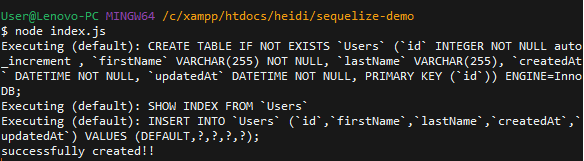
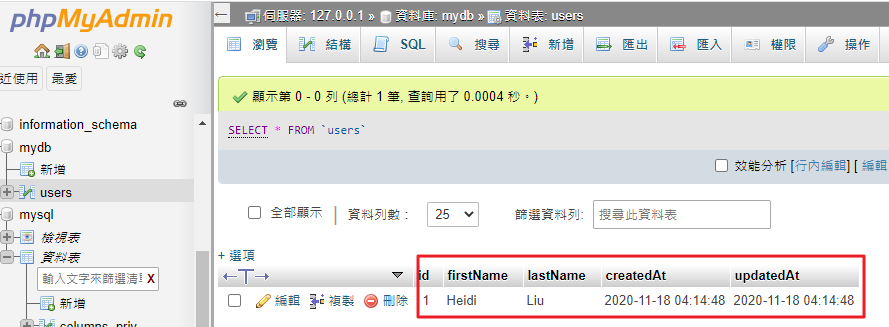
Sequelize 就會根據 Model 定義,自動在資料庫建立 users table 和一筆資料,並且會自動生成 createdAt 和 updateAt 兩個欄位:
.findAll():選取所有資料
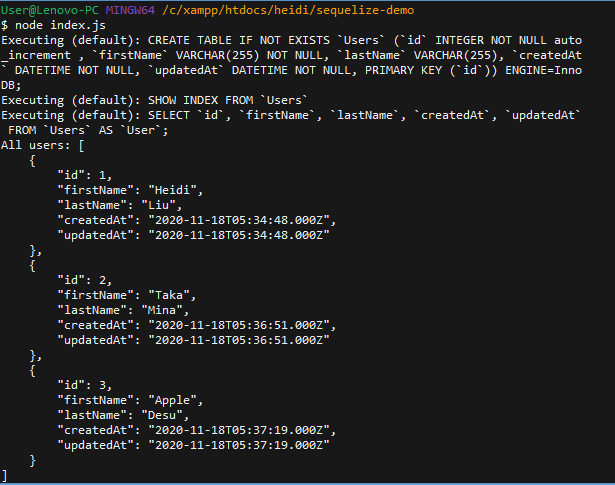
如果要選取所有資料,就在 .then() 裡面用 <Table Name>.findAll(),而 findAll() 會回傳一個 promise,因此也要用 .then() 來接收:
1 | sequelize.sync().then(() => { |
就能拿到 All users 的資料:
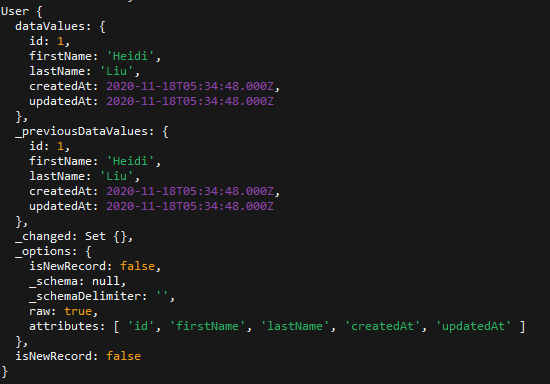
若試著印出 user[0] 的資料:
1 | sequelize.sync().then(() => { |
會得到一個 User 物件,除了資料訊息,也會有一些底線開頭的屬性,像是 Sequelize 設定的資訊:
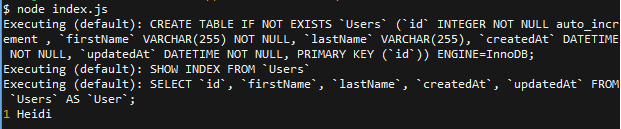
如果要存取 user 的資料訊息,可直接用 user[0].id 來拿到 id:
1 | sequelize.sync().then(() => { |
.findAll(where{ }):設定資料條件
如果要指定讀取哪些資料,可在 .findAll() 裡面填入 where{} 這個物件來指定條件。假如在資料庫中找不到相對應的資料,就會回傳錯誤訊息:
1 | sequelize.sync().then(() => { |
印出符合條件的資料:
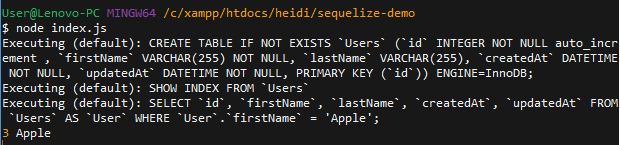
這種寫法就相當於 SQL 語法的 SELECT * FROM users WHERE firstName = Apple,更多有關條件設定的語法可參考:官方文件 - Model Querying。
.findOne():選取單一資料
如果只想選取單一資料,或是想要透過 id 來讀取資料,可以使用 .findOne():
1 | sequelize.sync().then(() => { |
成功撈取指定資料之後,就可以對該筆資料進行 CRUD。
.update():更新資料
如果要更新資料,可使用 .then() 接住資料,並在裡面傳入 function,用來執行 user.update(),把要更新的內容用 {} 大括號包住,再填入 update() 中:
1 | sequelize.sync().then(() => { |
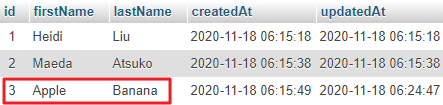
這樣就成功更新 id 為 3 這筆資料的 lastName:
.destroy():刪除資料
如果要刪除資料,可使用 .then() 接住資料,並在裡面傳入 function,用來執行 user.destroy():
1 | sequelize.sync().then(() => { |
Associations 資料庫關聯
再來我們要學習如何做資料庫關聯,也就是將兩個不同的 table 關聯,例如將 users.id 對應到 comments.userId。我們在之前課程使用的 SQL 指令,就是透過 user.id 或是 JOIN 等方式來進行資料庫關聯。
而在 ORM 當中,要將兩個 table 進行關聯,則需要透過 .hasMany()、.hasOne 等指令,告訴 Sequelize 執行資料庫關聯,詳細內容可參考官方文件。
如何關聯兩個 table
以 User.hasMany(Comment) 指令來說,意思就是告訴 Sequelize 一個 user 可以有很多 comment,接著就會在 comment table 中加上 userId 來建立關聯:
1 | const User = sequelize.define('user', { |
執行後就會發現建立了 comments table,還多了 userId 這個欄位:

範例:新增留言
接著我們就能對資料庫進行操作,以新建一個 comment 為例,在 Comment 要填入 content 和 userId:
1 | sequelize.sync().then(() => { |
執行成功會印出設定的 done!:
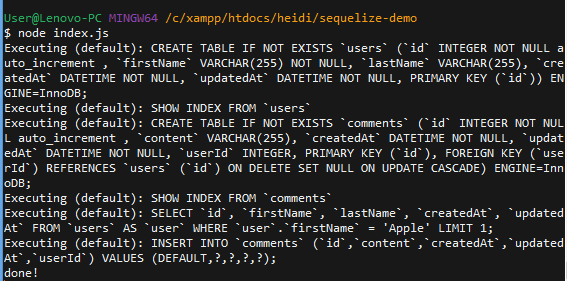
這樣就成功在 comments table 建立了一則留言:

範例:撈取資料
接著我們就可以利用關聯的 user id 來撈取資料,透過 include:<Table> 這個參數來指定 Model,如果要 include 多個 Model 可透過 Array 傳入:
1 | sequelize.sync().then(() => { |
若把 user 資料印出來,會發現包含很多資訊:
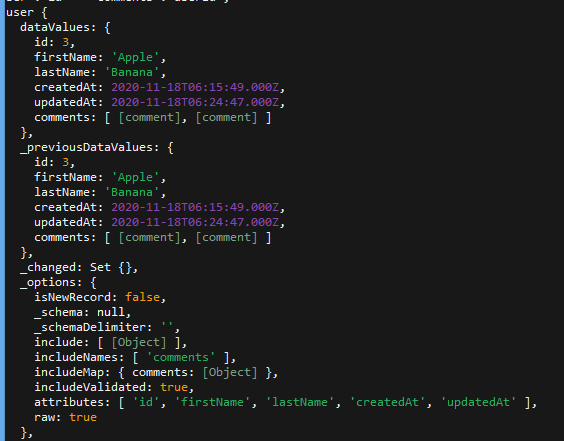
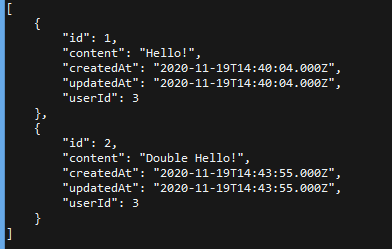
利用 JSON.stringify() 來格式化輸出,即可忽略不需要的資訊:
1 | sequelize.sync().then(() => { |
就會拿到 userId 為 3 的使用者的所有留言:
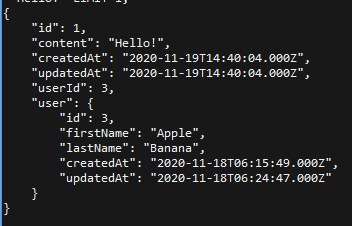
而 User.hasMany(Comment); 其實是單向關係,也就是將 User 對 Comment 進行關聯,但沒有說明 Comment 和 User 的關係是什麼。這時如果要從 comment 來查詢 user 的資料,就會出現錯誤訊息。
需要加上 Comment.belongsTo(User),透過這段指令將 Comment 對 User 做關聯,建立起雙向關係:
1 | User.hasMany(Comment); |
就會拿到有關 comment 的 user 資訊:
什麼是 N+1 Problem?
上面的 include 其實正是 N+1 problem 的解法。所謂 N+1 problem,是指先用一次查詢撈出 N 筆資料(例如所有 user),再於迴圈中逐筆查詢每個 user 的 comments,總共就會發出 1 + N 次 SQL 查詢。當資料量變大,這會對資料庫造成大量不必要的負擔。
而透過 include(也就是 eager loading,預先載入),Sequelize 會改用 JOIN 的方式一次撈出關聯資料,只需要一次查詢就能拿到 user 和其所有 comments,這也是使用 ORM 時特別需要留意的效能問題。
Sequelize CLI
在實際開發時,為了讓程式碼更有結構性以及方便管理,可安裝 Sequelize CLI 這套工具,詳細內容可參考官方文件。
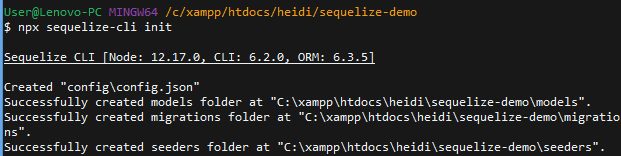
安裝並初始化
1 | $ npm install --save sequelize-cli |
完成初始化會建立 config.json 檔案,裡面會有連線資料庫的設定,包含 database 帳密等資訊,因此通常不會加到 commit:
設定連線資料庫
接著可以在 config.json 更改成我們連線資料庫的設定,三種設定分別是在開發環境、測試環境、正式環境。因為我們現在是在 localhost 開發所以要修改 development 的部分:
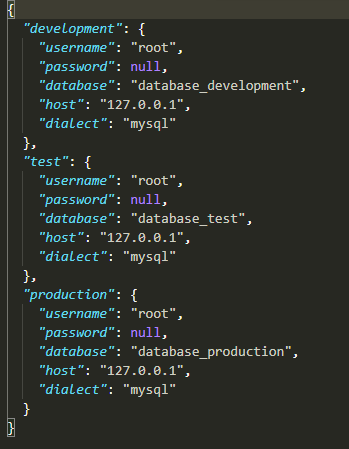
建立 Model
接著我們可以直接透過 CLI 指令來建立 User 和 Comment 這兩個 Model:
1 | $ npx sequelize-cli model:generate --name User --attributes firstName:string,lastName:string,email:string |
建立好 Model 之後,Sequelize 會自動在 models 和 migrations 資料夾底下建立檔案:

我們可以透過 user.js 和 comment.js 這些檔案設定,來對 model 進行微調:
1 | ; |
執行 Migrations
但設定完這些檔案之後,資料庫裡面還不會有任何東西。這是因為必須透過執行 Migrations,才會依照我們在 Model 做的設定去操作資料庫:
1 | $ npx sequelize-cli db:migrate |
接著就會在資料庫建立 SequelizeMeta table 來記錄執行過的 migrations;並且依照 migrations 中的檔案去操作資料庫,也就是建立 users 和 comments table:
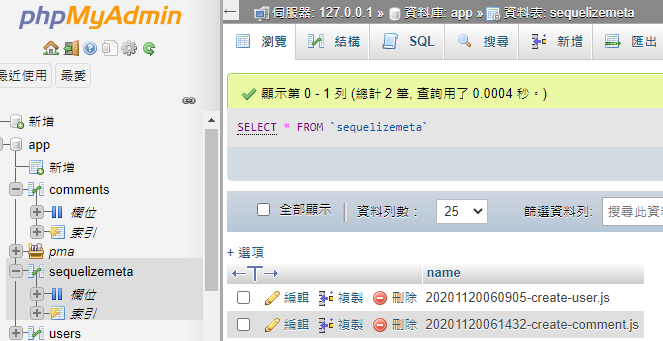
有了 migrations,就不需再透過 sync() 指令來操作資料庫,並且能夠以更結構性的方式進行管理。
透過 Migrations 關聯資料庫
接著在建立好的檔案 user.js 和 comment.js 加上關聯設定,其中 model 通常會以英文大寫開頭:
- user.js
1 | ; |
- comment.js
1 | ; |
新增資料
再來回到根目錄的 index.js,即可從 models 引入 db 來使用:
1 | const db = require('./models'); |
以下列程式碼為例,如此就可以透過 index.js 來操作資料庫:
1 | const User = db.User; |
執行後成功在 User 新增一筆資料:

改造留言板系統
在瞭解到什麼是 Sequelize 和 ORM 之後,接著我們要來改造之前實作的留言板系統,也就是把 Model 部分改用 Sequelize 實作。
前置作業
在 express 專案中引入 Sequelize 套件,並進行初始化:
1 | $ npm install sequelize mysql2 |
接著在建立 Model 之前,可以先清除不必要的檔案和程式碼,例如 db.js、todocontroller、以及原本 models 的部分。
設定連線資料庫
接著修改 config.json 資料庫連線的設定:
1 | "development": { |
建立 Model
再來要建立 User 和 Comment 兩個 Model:
- 因為已經要把兩個 table 進行關聯,Comment table 就不須再加上 username 欄位
- string 型態預設會建立 VARCHAR,最大長度為 255,因此可以把 content 改用 text
- 在新增之前記得先把舊的同名 table 移除,避免互相干擾
1 | $ npx sequelize-cli model:generate --name User --attributes username:string,password:string,nickname:string |
執行後會在 models 建立檔案:
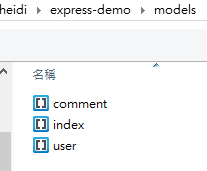
執行 Migrations
再來執行 Migrations,才會真正把資料寫入資料庫來建立 table:
1 | $ npx sequelize-cli db:migrate |
執行後會在資料庫建立 table:

但我們還需要在 comment table 加上 UserId 欄位,這部分要自己手動修改 migrations 中的 create-comment 檔案:
1 | // 新增 UserId 這個欄位,型態是數字 |
接著要重跑一次 Migrations,可透過下方
指令來撤銷上一個動作:
1 | // 單次撤銷(最近的一次) |
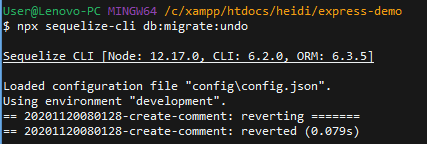
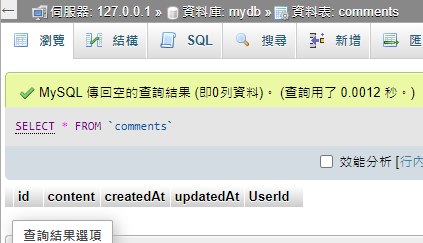
到資料庫會發現 comments 不見了,但 users 不會受到影響:

再跑一次 Migrations 建立 Comment table,會多一個 UserId 欄位:
補充:設定 username 為 UNIQUE
此外,也可透過修改 create-user 檔案,把 username 欄位設定為 UNIQUE,然後再重新 Migrations。如此可避免註冊時會有重複的 username:
1 | username: { |
關聯資料庫
再來要進行資料庫關聯,分別在 models 資料夾中的 user.js 和 comment.js 加上關聯指令:
1 | // user.js |
1 | // comment.js |
修改 Controllers
接著要來修改 user 和 comment 的 Controllers,也就是原本處理 userModel 的部分:
- controllers\user.js
- 拿掉原本引入的 userModel,改成引入 db 中的 models:
1 | const db = require('../models'); |
- 修改 handleLogin:
1 | handleLogin: (req, res, next) => { |
- 修改 handleRegister:
1 | handleRegister: (req, res, next) => { |
- controllers\comment.js
- 拿掉原本引入的 commentModel,改成引入 db 中的 models:
1 | // 從 models 引入 db |
- 修改 add:
1 | add: (req, res, next) => { |
- 修改 index:
1 | index: (req, res) => { |
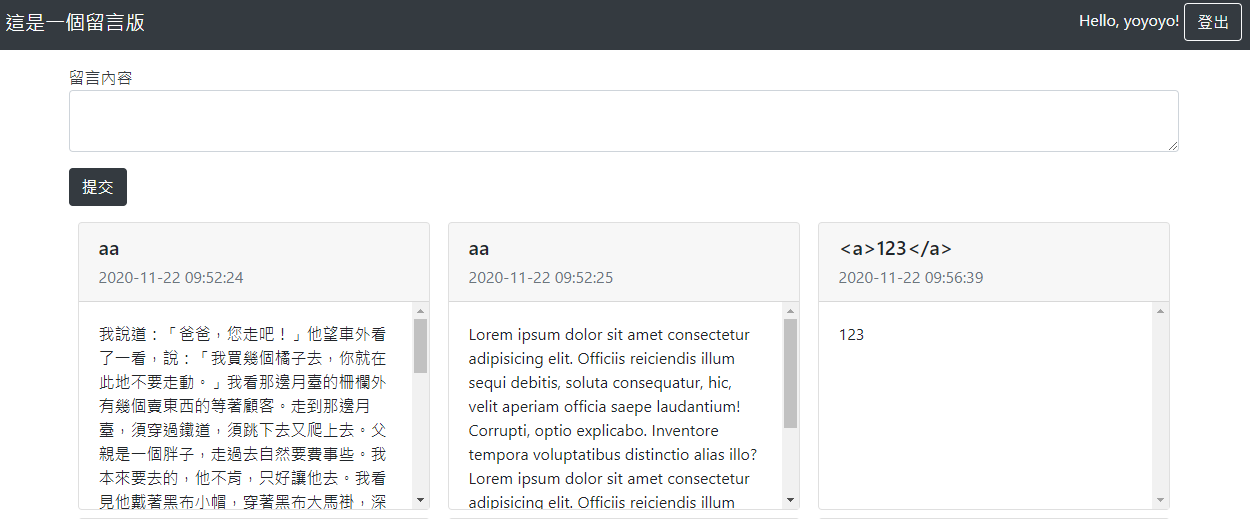
因為資料形式改變,必須修改 View 的部分,例如拿取 nickname 的部分,要改成 comment.User.nickname 來透過關聯拿取:
1 | <!-- index.ejs --> |
- 修改 delete:
1 | delete: (req, res) => { |
- 修改 update 和 handleupdate:
1 | update: (req, res) => { |
修改結果:
結語
這樣就成功透過 Express 搭配 Sequelize 修改之前的留言板結構,即使不使用 SQL 指令,也能以 ORM 提供的物件導向形式來操作資料庫。
這種寫法和之前使用 PHP & MySQL 實作留言板的方式很不相同:以前會比較偏向先完成切版,然後一步一步增加功能;但以 MVC 架構去撰寫程式碼,會先規劃不同功能對應的不同路由,接著再規劃 Model 資料結構,以及如何呈現在畫面上,這使得整體結構分工更明確,也有助於後續的維護。
參考資料:
- [ 筆記 ] Express 03 - ORM & Sequelize
- [Day20] 資料庫設計概念 - ORM